
If you run a small business, you know the truth: you are not just the owner; you are the marketer, the bookkeeper, the chief of customer service, and often, the cleaner. You are perpetually wearing too many hats, and the biggest threat to your growth is burnout caused by relentless, manual, repetitive administrative work. Every minute spent on data entry or manual follow-ups is a minute stolen from serving customers, refining your product, or, crucially, resting.
One of the biggest time sinks in any small business is the gap between customer input and your automated response. When a customer fills out a form- whether it’s for a quote, a service booking, or a piece of feedback- that precious data often gets stuck in a digital holding pattern. You rely on complex, expensive third-party tools or frustrating manual syncs to move the data from your beautiful, high-converting forms (like Typeform) into your powerful business automation platform (like Hustlery).
This delay, this friction, is not just annoying; it costs you sales and damages your professional image.
The game is changing. Hustlery has launched a native, direct integration of Typeform Actions and Triggers into its Workflows. This update isn’t just for big corporations; it is the ultimate no-code automation solution designed to free up the most valuable commodity for the small business owner: your time. This integration is the answer to the crucial question: “How can I automate my Typeform lead qualification without expensive third-party tools?”
This comprehensive guide will show you how to leverage this instant, native connection to eliminate data lag, reclaim your administrative hours, and deliver an unparalleled customer experience that converts browsers into loyal patrons.
The Cost of Slowness: Why You Lose Leads to Slow Response Times
For a small business, every customer interaction is high-value. When someone takes the time to fill out your form, they are actively raising their hand, showing purchase intent.
The 5-Minute Crisis for Small Business Marketing Automation
In the lead generation world, the “5-Minute Rule” is sacrosanct: if you don’t respond to a hot lead within five minutes, your chance of converting them plummets.
For a small business relying on manual processes or slow, polling-based third-party connections, this rule is your biggest enemy. If a form is submitted at minute 1 of a 15-minute polling cycle, your automated follow-up won’t even begin until minute 15. The customer has already moved on, checked a competitor, or forgotten why they even filled out the form. You need an instant lead capture system, and polling intervals will not provide it.
Eliminate Third-Party Tool Cost and Complexity
Before this native integration, the typical small business setup required paying for and maintaining a complex, three-part bridge. This introduced three major headaches that drain your budget and energy: Subscription Bloat (an extra monthly fee), Maintenance Hassle (troubleshooting broken connections), and Data Delay (Latency).
The native Typeform integration solves all three problems instantly. It is a single, reliable, zero-lag connection that reduces your tech stack cost and frees you from the maintenance nightmare, allowing you to focus purely on your customers. For a small business, this is the most cost-effective automation upgrade you can make.
Deep Dive into Instant Lead Capture and Qualification
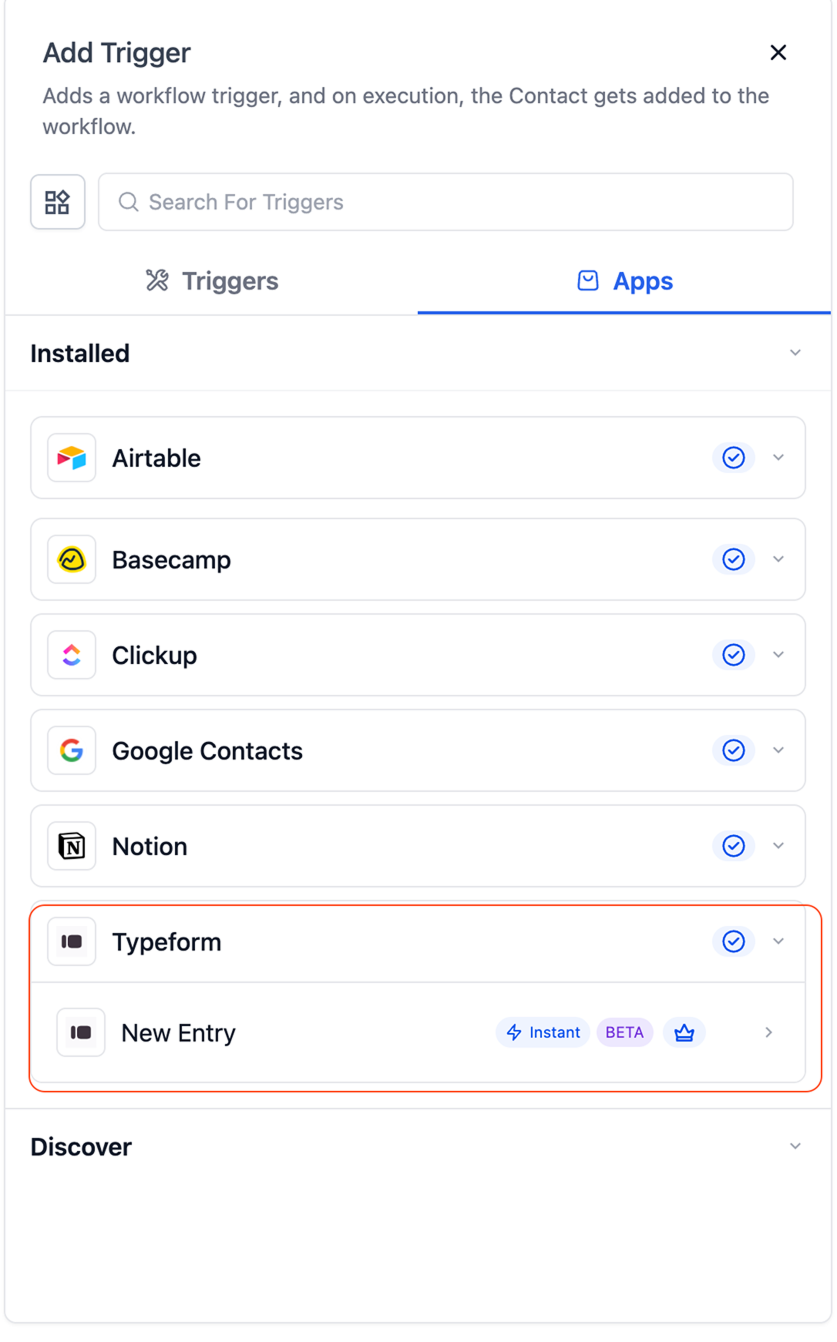
The real magic starts with the new trigger: New Entry (Instant). This is the definition of zero-lag lead qualification because it’s a webhook-based push notification. The moment your customer clicks ‘Submit’ on your Typeform, Typeform sends an immediate, direct signal to your Hustlery Workflow. The result is true, real-time automation.
Use Case: The Immediate Appointment Setter
Imagine you run a local consulting firm or a specialized service business. Your Typeform asks qualifying questions to gather rich data.
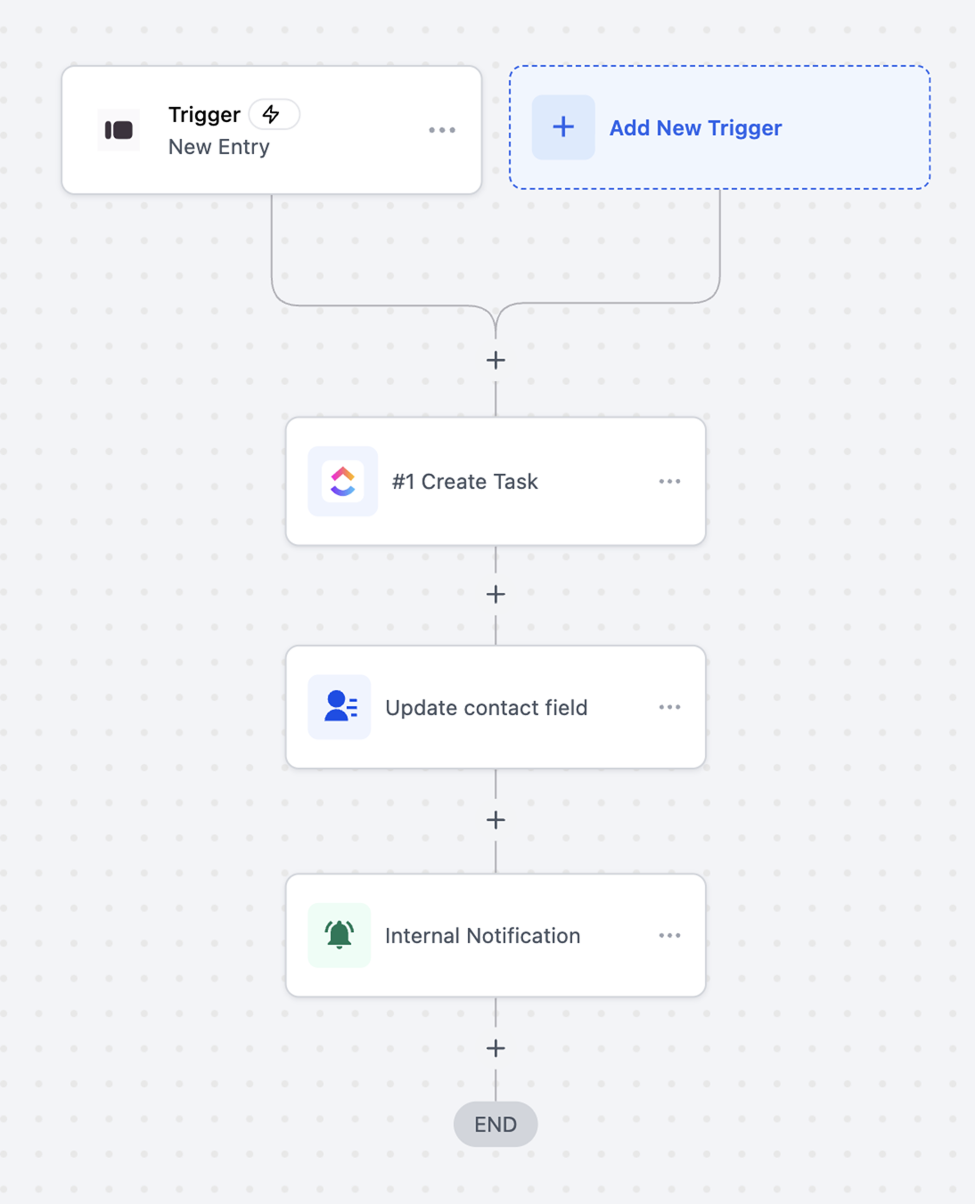
To automate the instant appointment setting, your workflow first uses the Typeform: New Entry (Instant) trigger to kick off the automation the millisecond the data is received. Next, Hustlery instantly creates or updates the contact record and applies a tag (e.g., HOT LEAD – CONSULTATION), performing immediate CRM enrichment. The system then immediately sends an SMS or Email to the customer, personalizing the message with data points pulled directly from the form. Simultaneously, Hustlery sends an internal SMS alert to you or your key team member.
Because this happens instantly, the customer feels seen, their intent is confirmed, and your conversion rate on that calendar booking link will skyrocket. This is how you use automation to stop losing leads to slow response times.
Leveraging Conditional Logic for Hyper-Personalization
Typeform is excellent for asking complex questions. Because the trigger is instant, you can build powerful logic into your workflows to categorize customers immediately: If the answer to “Budget” is high, apply tag VIP TIER. If the answer to “Pain Point” is X, enroll them directly into the specific email nurture sequence that addresses X. You are not just capturing data; you are using it immediately to personalize the customer’s journey, making them feel like your business understands their unique needs from the very first second.
Eliminating Admin Work with Typeform Form Management
This is where the small business owner completely reduces administrative work. The Typeform Actions allow your Hustlery Workflows to control and manage your Typeform account, turning it into a dynamic asset manager. These actions are premium but their ROI is measured in precious hours of time saved and errors avoided, effectively solving the “wearing too many hats” problem.
Action 1 & 2: Automate Internal Form Creation and Template Management
The actions Create Empty Form and Duplicate Existing Form are essential for managing repetitive internal processes, customer feedback cycles, or recurring events.
The automated solution works like this for new staff intake: The workflow is triggered when a new staff member is tagged (Tag: New Staff Hired). Next, the system uses the Typeform: Duplicate Existing Form action multiple times, once for each required form (Onboarding, NDA, Payroll). Each action instantly spins up a unique new form ID. Hustlery then updates Custom Fields on the new contact record with these automatically generated unique form URLs. Finally, a welcome email is sent to the new staff member with the perfectly personalized links.
You have just used workflow automation to eliminate a 30-minute manual task, allowing you to focus on training or serving paying clients instead. This is how Typeform Workflows drive genuine productivity.
Action 3: Search Historical Responses for Superior Customer Service
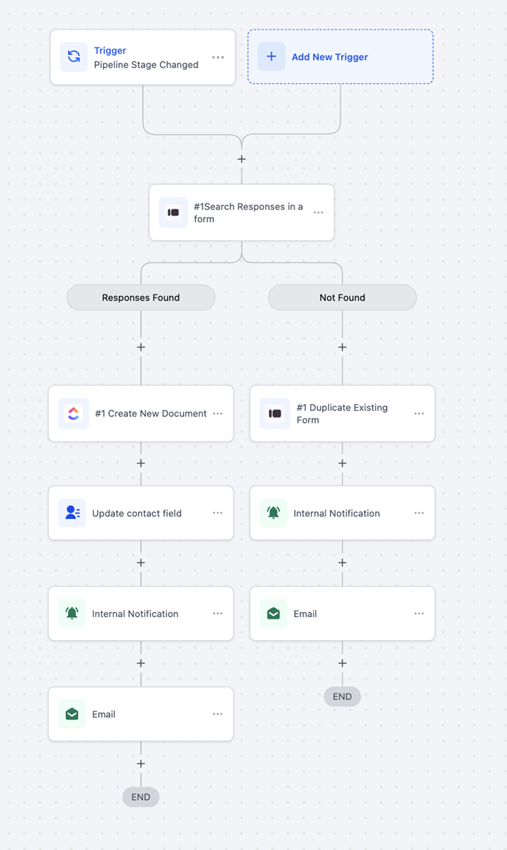
The action Search Responses in a Form transforms Typeform from a simple input tool into a customer context database. It allows Hustlery to retrieve old data when a customer performs a new action.
For example, when a returning customer places a new order (new order trigger), the system uses the Typeform: Search Responses in a Form action to find a historical feedback response detailing an issue they had with product packaging six months ago. The workflow instantly updates the Hustlery record with this Packaging_Concern and sends a Notification to your shipping department: “New order for David. Note: His previous delivery had an issue with the packaging. Please ensure double-packing on this order.” This ability to instantly fetch and act on historical context is a superpower for the small business owner dedicated to exceptional customer care and is key to CRM data enrichment.
Blueprint for Daily Efficiency: Practical Workflows for Small Business Owners
To make this automation strategy actionable, here are two integrated blueprints designed for maximum time savings.
Blueprint 1: The Automated Post-Service Feedback Loop
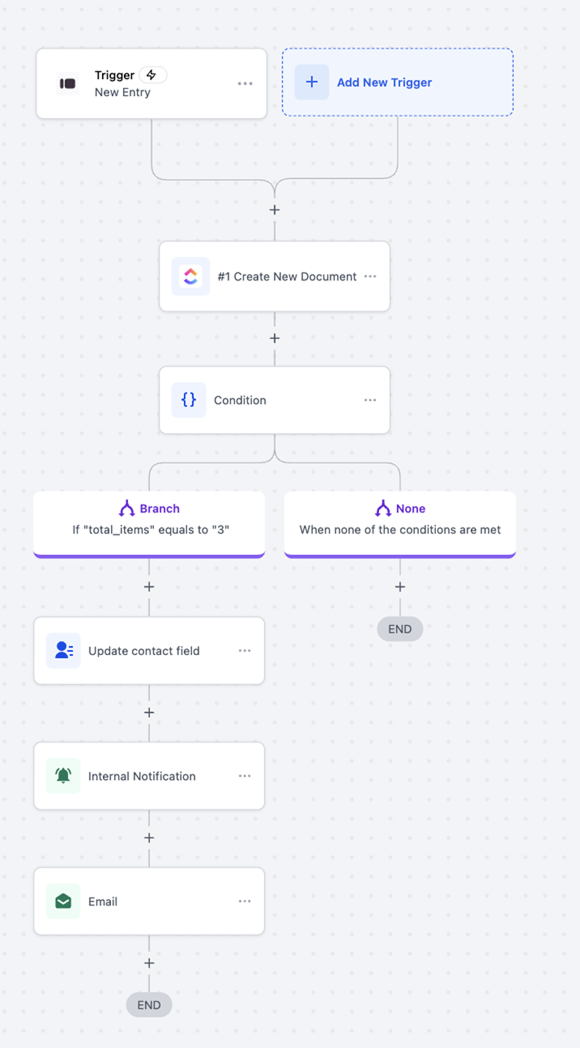
This flow is critical for reputation management and reducing churn. The process is triggered when an Opportunity Stage Change occurs to “Service Completed/Paid.” The system then uses the Typeform: Duplicate Existing Form action to spin up a unique, clean survey for this transaction, ensuring clean form data synchronization. The survey link is sent via email. The workflow then waits for feedback OR immediately proceeds upon the Typeform: New Entry (Instant) trigger. An If/Else Condition checks the satisfaction score. If the score is high, the contact is enrolled in a Google Review Request campaign (Path A). If the score is low, an Internal Notification is sent to the owner (Path B). This entire loop runs automatically, turning feedback into reputation boosters or immediate human intervention without you ever having to manually check a score.
Blueprint 2: The E-Commerce Product Launch Manager
This flow manages new product testing and iteration. The process is triggered when a new product launch is initiated. The system uses the Typeform: Create Empty Form action to instantly generate a new, blank form specifically for that product’s feedback. The workflow updates a Custom Field to store the unique form URL. After a seven-day Wait step (for product delivery), an Email is sent with the link to the new product feedback form. Immediate capture of feedback is ensured by the Typeform: New Entry (Instant) trigger on that new form. Finally, an If/Else condition checks for Negative Keywords in text fields, and if found, an instant internal alert is sent, allowing the team to quickly identify critical issues.
Implementation and The Bottom Line ROI
For the small business owner, every dollar must generate a return. The Typeform integration delivers a profound ROI by multiplying your capacity to serve customers without increasing your labor cost.
The ROI Calculation: Time Is Money
The premium nature of the Typeform Actions is a small transaction cost that saves massive labor cost. If you save just 30 minutes of administrative time per week by automating form creation, duplication, and search- that’s 2 hours per month, time you can dedicate to revenue-generating activities. This ability to grow your business without instantly needing to hire another full-time administrator is the definition of sustainable, cost-effective automation.
Getting Connected is Simple: Your Typeform Hustlery Workflow Tutorial
The native connection means setup is quick and painless: Simply navigate to the Workflow Builder in Hustlery, and when adding a new trigger or action, search for “Typeform.” Click the Connect Now button, and you’ll be guided through logging into your Typeform account to authorize the access. That’s it. No messy webhooks to configure manually, making this a true no-code solution for automating your Typeform data into Hustlery.
Own Your Customer Journey
The new native Typeform and Hustlery integration is the ultimate efficiency tool for the small business owner. It hands you back control over the most crucial point in your customer’s journey: the moment of input.
● Stop losing leads to manual follow-ups.
● Stop paying for extra, complex bridge software.
● Stop wasting your valuable time on manual data entry.
Embrace the instant trigger for unparalleled speed and the powerful actions for true administrative automation. By eliminating the friction between Typeform and Hustlery, you’re not just improving your systems; you’re professionalizing your operation, increasing your revenue potential, and giving yourself the peace of mind that comes from knowing your customer journey is instant, reliable, and perfectly managed.
Take the first step today: connect your Typeform account in Hustlery and start building the workflows that will finally free you from the administrative treadmill. What will you do with the extra time you save?